Under Construction
This section is currently being developed and may be incomplete/outdated.
How Waveshift Works
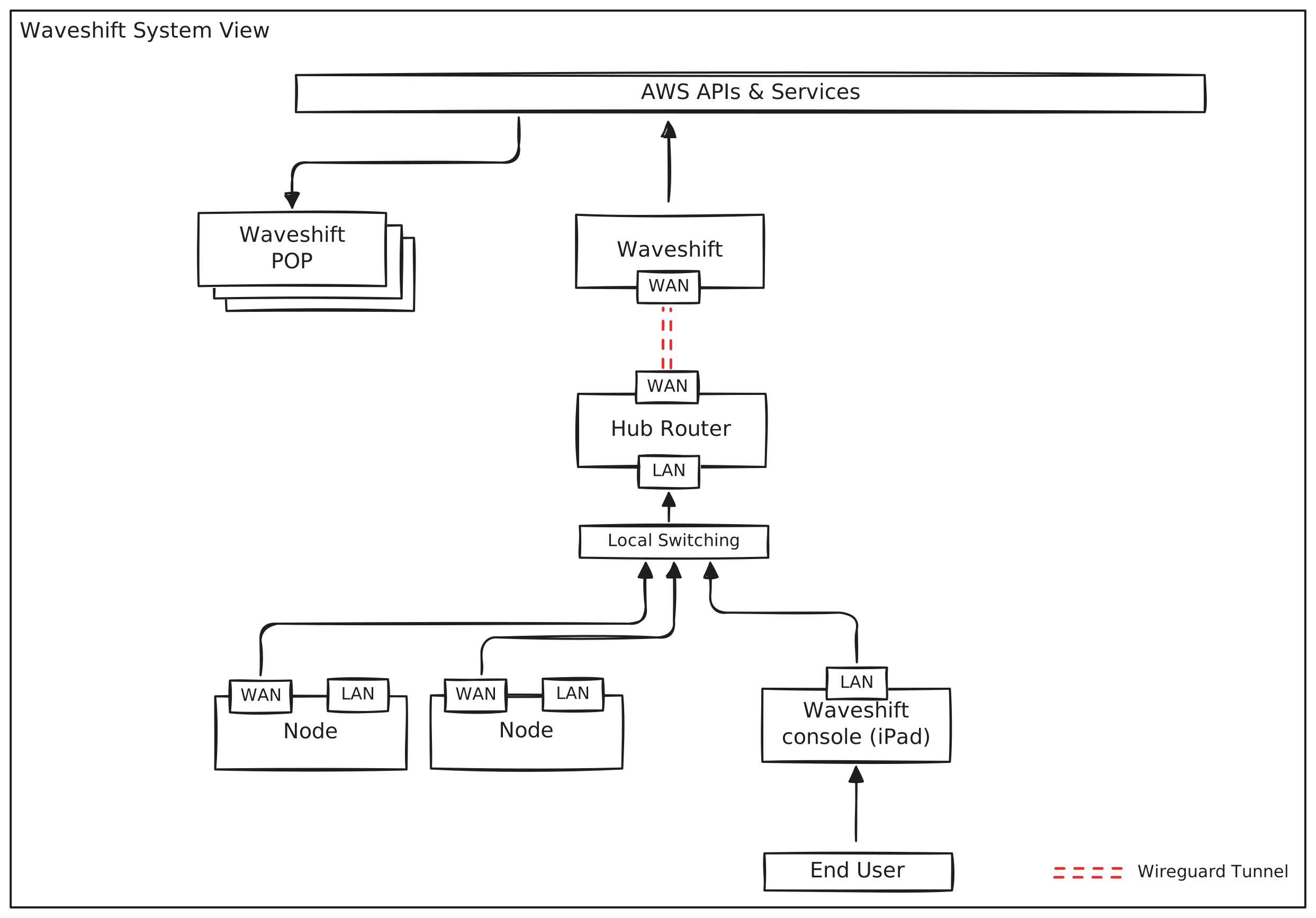
Waveshift is a comprehensive networking platform that combines hardware nodes, cloud infrastructure, and advanced privacy features to create secure, anonymous internet access and private mesh networking capabilities.
System Overview
The Waveshift system consists of three key components:
1. Control Hub
A GL.iNet router flashed with Waveshift firmware that manages and coordinates all connected nodes. It serves as the entry point for control data traffic to the Waveshift Control Plane hosted in AWS.
2. Nodes
Configurable GL.iNet routers (Slate AX) flashed with Waveshift firmware. Nodes allow non-Waveshift devices to be bootstrapped into the Waveshift network by providing local network connectivity with automatic VPN routing.
3. Waveshift Control Plane (WCP)
The cloud-hosted management system running in AWS that: - Provisions Points of Presence (PoPs) on demand - Manages WireGuard configurations - Coordinates between nodes and egress servers - Provides the user interface for management
Network Architecture
Physical Network Topology
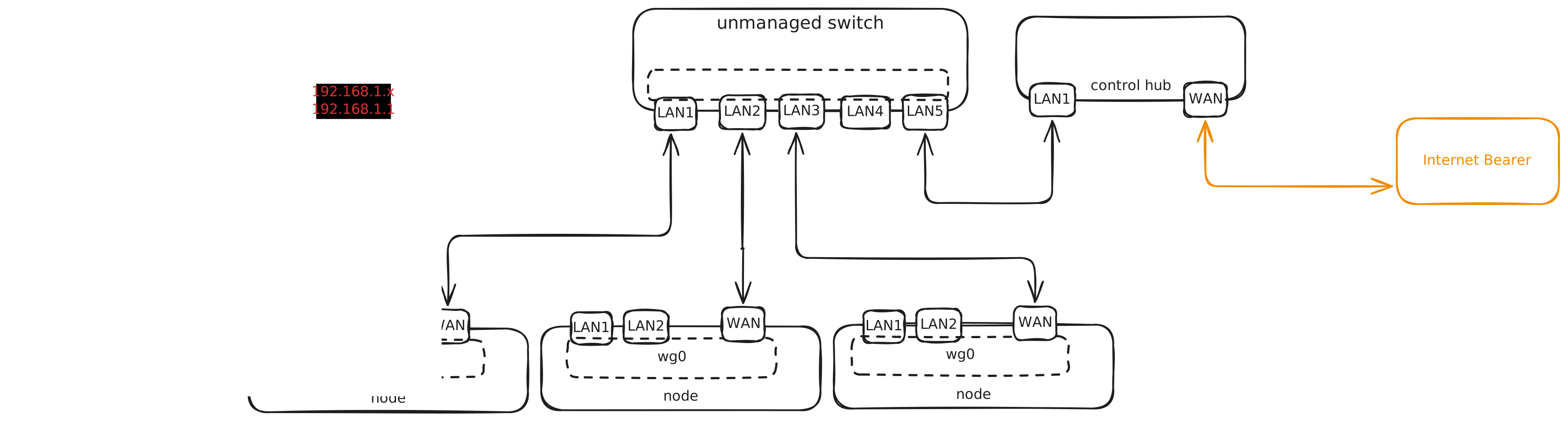
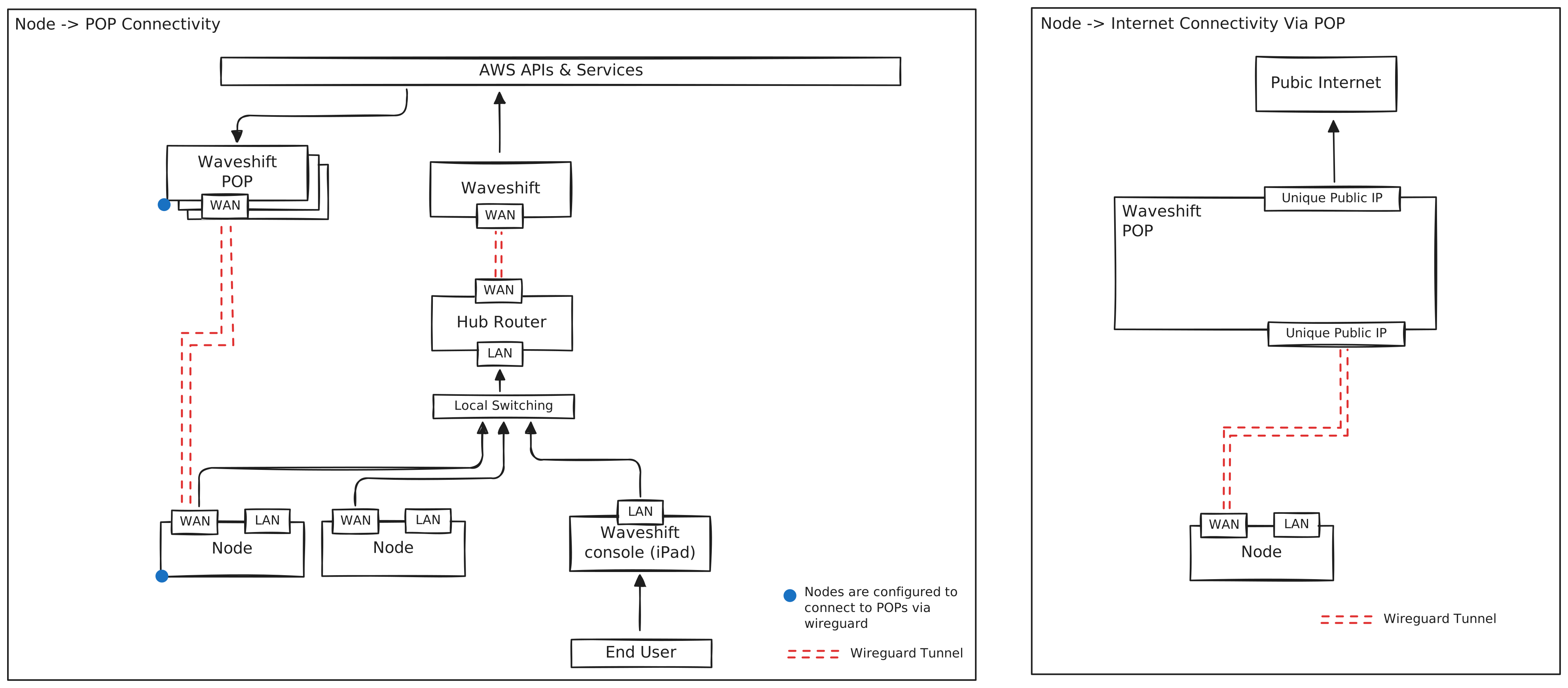
The Waveshift network connects local devices through a layered architecture:
- Local Area Network (LAN)
- Nodes provide LAN connectivity for user devices
- Devices connect via Ethernet to the nodes
-
All traffic is automatically routed through secure WireGuard tunnels
-
Control Hub Connection
- Control Hub connects to the internet via a standard router
- Creates WireGuard tunnel to Waveshift Control Plane in AWS
-
Nodes connect to both Control Hub (for management) and internet (for data)
-
Multiple Internet Circuits
- Each node should ideally have its own internet circuit with unique egress IP
- This maintains privacy by preventing traffic correlation
Point of Presence (PoP) Architecture
What is a PoP?
A Point of Presence is an on-demand AWS infrastructure deployment that provides: - WireGuard VPN server with unique public IP - Optional Cloudflare WARP integration for traffic normalisation - Optional Kasm Workspaces integration for secure browsing - Private peer-to-peer connectivity between devices
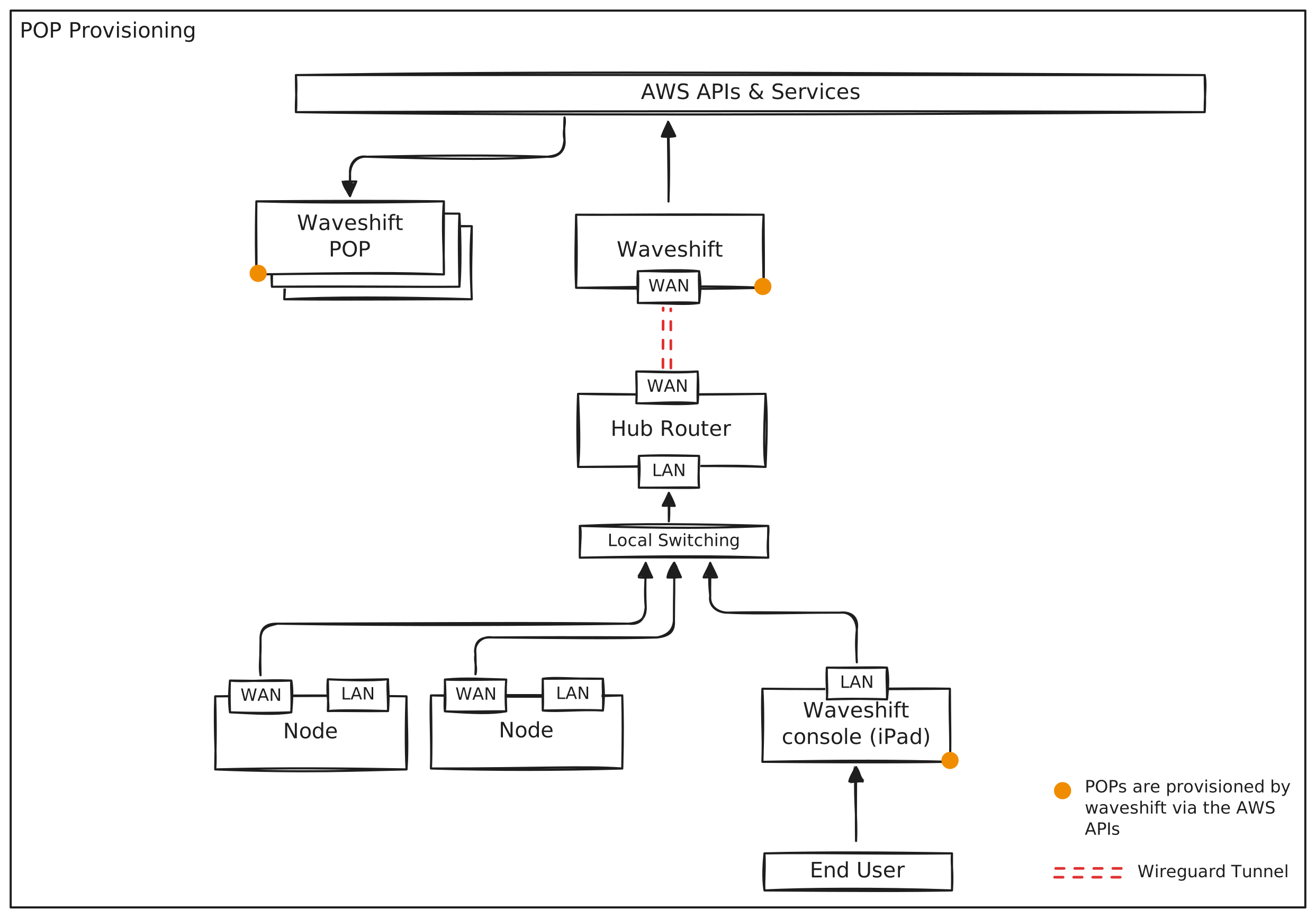
PoP Provisioning Process
When a user provisions a PoP through the Waveshift console:
- User Configures PoP via web interface, selecting:
- Egress location (AWS region)
- Enable/disable Node integration
- Enable/disable Kasm Workspaces
- Enable/disable Cloudflare WARP final egress
-
Number of additional WireGuard peer configs
-
Control Plane Provisions Infrastructure:
- Deploys EC2 instance in selected AWS region
- Configures WireGuard server
- Generates peer configurations
-
Sets up security groups and networking
-
Configuration Distribution:
- WireGuard configs made available via QR codes or files
- Nodes automatically configured if Node integration enabled
- Kasm workspace automatically configured if enabled
PoP Build Sequence
The automated build process follows a specific sequence:

Node Configuration and Connectivity
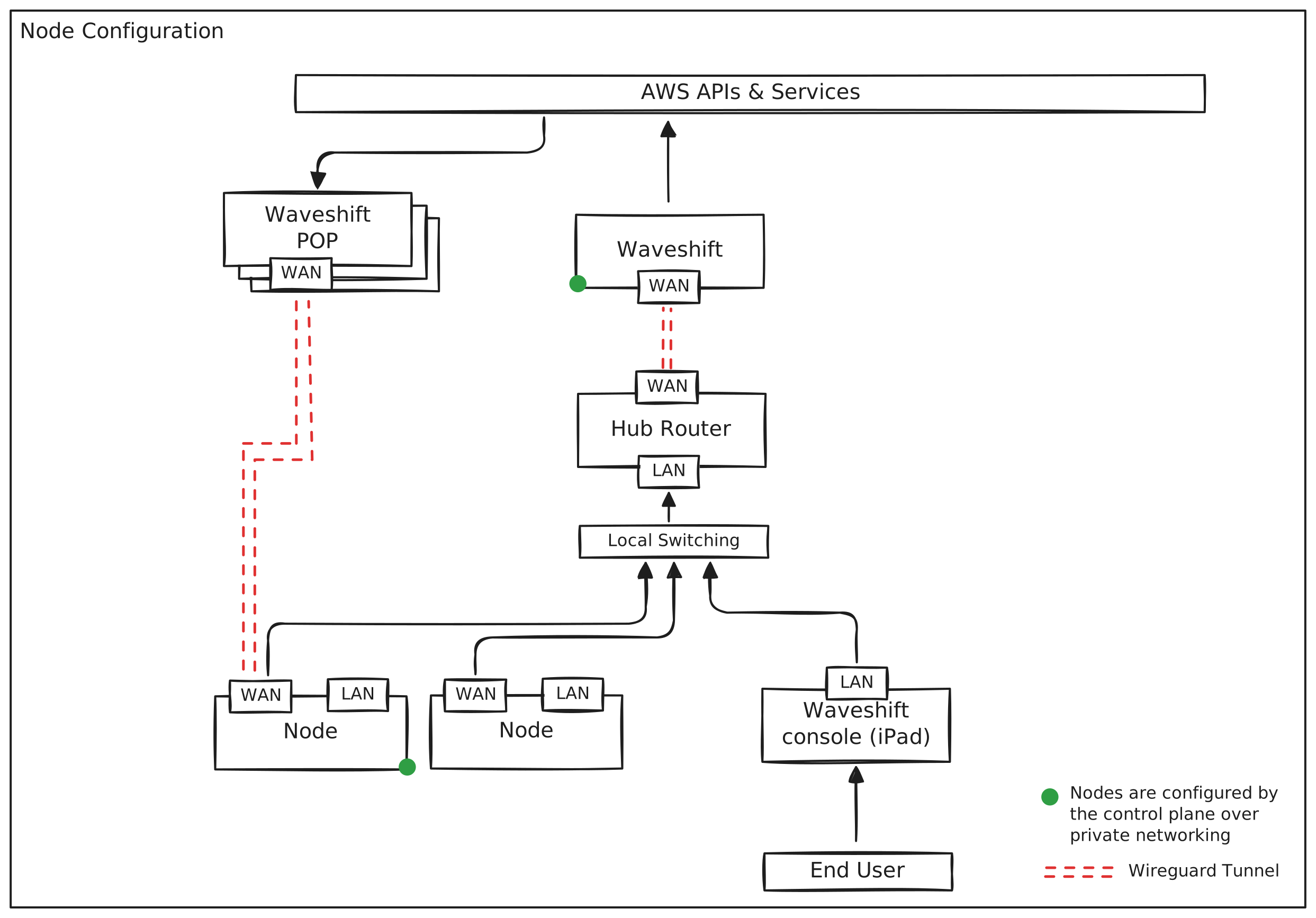
Automatic Node Configuration
When a PoP is built with Node integration enabled:
- Control Plane selects an unassigned node from the pool
- WireGuard configuration is automatically deployed to the node
- Firewall rules and VPN killswitch are configured
- Node becomes associated with the PoP
Node Internet Connectivity
Nodes provide secure internet access for connected devices:
- Device connects to Node LAN port
- Traffic is routed through WireGuard tunnel on the node
- VPN killswitch ensures no traffic leaks if tunnel fails
- Traffic egresses through the PoP's public IP address
- Optional Cloudflare WARP provides additional anonymisation
Data Flow Overview
Basic Traffic Flow
graph LR
    A[User Device] -->|Ethernet| B[Node LAN]
    B -->|WireGuard Tunnel| C[AWS PoP]
    C -->|Optional Cloudflare| D[Public Internet]
Detailed Data Path
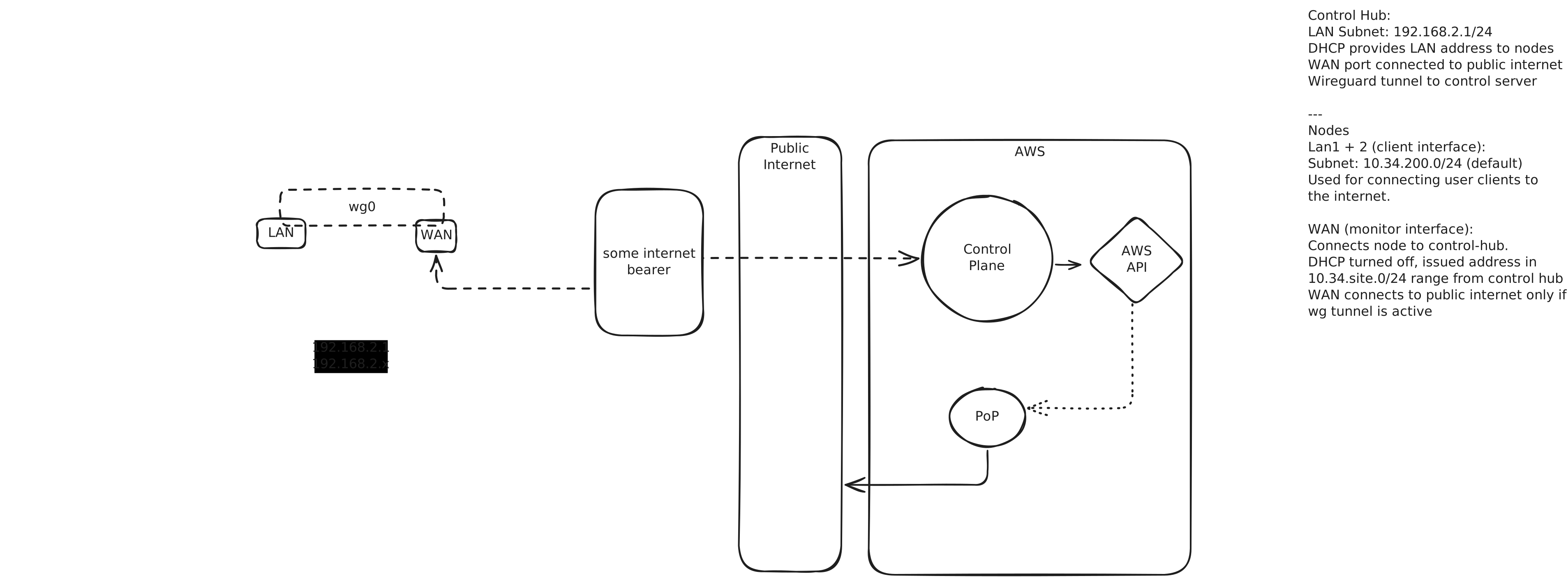
Traffic Flow Steps:
- User device connects to Node via Ethernet
- Node encrypts all traffic with WireGuard
- Traffic traverses internet through Node's circuit
- AWS PoP decrypts WireGuard traffic
- If Cloudflare disabled: Traffic egresses directly from PoP
- If Cloudflare enabled: Traffic re-encrypted and sent to Cloudflare WARP
- Cloudflare WARP decrypts and sends to public internet
- Response follows reverse path
Cloudflare WARP Integration
Why Integrate Cloudflare WARP?
Waveshift uses a hybrid approach combining AWS PoPs with Cloudflare WARP to provide:
Benefits of AWS PoPs: - Full control over infrastructure - Choose specific egress location - No shared VPN IP addresses - Transparent operation
Benefits of Cloudflare WARP: - Massive anonymity set (millions of users) - Shared exit IPs - Traffic normalisation - Additional layer of encryption
Traffic Normalisation
By routing through Cloudflare WARP:
- Your traffic is encrypted by WireGuard to AWS PoP
- AWS PoP forwards to Cloudflare WARP server
- Cloudflare sees traffic originating from AWS (not your real IP)
- Internet sees traffic coming from Cloudflare shared IP
- Your origin is protected by two layers of anonymisation
This is what we call traffic normalisation - your traffic blends into millions of other Cloudflare WARP users, making it extremely difficult to identify or track.
Anonymity Set Comparison
| Service | Anonymity Set Size | Shared Exit IPs | Your Control | Use Case |
|---|---|---|---|---|
| Waveshift (AWS only) | Very small (just you) | No | Full | Private dedicated access |
| Waveshift + Cloudflare | Very large (millions) | Yes | High | Anonymous normalized access |
| Cloudflare WARP alone | Very large (millions) | Yes | None | Limited to nearby regions |
| Commercial VPN | Large | Yes | None | General anonymity |
Cloudflare Integration Sequence
sequenceDiagram
    participant Client
    participant Proteus
    participant AWS PoP
    participant Cloudflare

    Client->>Proteus: Request WG-CF Config
    Proteus->>AWS PoP: Build WireGuard Instance
    Note right of Proteus: Peer Public keys in User Data
    AWS PoP->>Cloudflare: Register Device (WGCF)
    Note right of AWS PoP: PoP Public key provided to Cloudflare
    Cloudflare-->>AWS PoP: Device Registration Response
    AWS PoP-->>Proteus: Server WG Pub Key
    AWS PoP-->>Proteus: WireGuard Instance Built
    Note right of Proteus: PoP Public Key via SSM Parameter Store
    Proteus-->>Client: WireGuard Peer Configs

    Client->>AWS PoP: Connect via WireGuard
    AWS PoP->>Cloudflare: Forward via WARP
    Note right of Cloudflare: Authenticate & Route Traffic
    Cloudflare-->>Internet: Normalized Traffic
Peer-to-Peer Networking
Devices on the same PoP can communicate directly and securely:
- Private VPN network between all peers on the same PoP
- End-to-end encryption via WireGuard
- No internet exposure for P2P traffic
- Multi-device collaboration possible
Use Cases: - File sharing between trusted devices - Remote desktop access - Private gaming servers - Secure team collaboration
Kasm Workspaces Integration
What is Kasm?
Kasm Workspaces provides containerized browser environments for secure web browsing.
Waveshift + Kasm
When Kasm integration is enabled on a PoP:
- Dedicated Kasm account is created for the user
- Browser workspace is automatically configured with PoP as egress provider
- All browser traffic routes through the selected PoP location
- Isolated environment protects your main device
- Destroy when done - all traces removed
Benefits: - Browser fingerprinting resistance - Sandboxed environment - No local trace of activity - Easy egress location switching
Security Features
Encryption
- WireGuard protocol for VPN tunnels (Curve25519, ChaCha20)
- End-to-end encryption between device and PoP
- No logging of traffic by default
- Forward secrecy protects past communications
Privacy Features
- VPN killswitch on nodes prevents leaks
- No DNS leaks - all DNS via WireGuard tunnel
- Firewall rules block non-VPN traffic
- Unique egress IPs per PoP (no sharing)
- Traffic normalisation via Cloudflare (optional)
Entropy and Key Generation
Waveshift ensures cryptographically strong WireGuard keys by:
- Public entropy sources - Uses Drand (distributed randomness beacon)
- Hybrid approach - Combines public entropy with local generation
- Authenticated sources - Only verified, signed entropy used
- Headless server protection - Ensures sufficient entropy even on cloud servers
Deployment Flexibility
Multiple Egress Locations
- Deploy PoPs in any AWS region worldwide
- Switch between locations instantly
- Multiple active PoPs simultaneously
- Each PoP is independent
Scalability
- Per-user limits: Up to 256 PoPs
- Per-PoP peers: Up to 254 devices
- Organisation limits: Configurable by admin
- On-demand provisioning: Spin up/down as needed
Summary
Waveshift provides:
✅ Privacy - Multi-layer anonymisation with traffic normalisation
✅ Control - Choose exact egress locations worldwide
✅ Flexibility - Nodes, direct configs, or Kasm workspaces
✅ Security - Strong encryption, killswitches, isolated environments
✅ Simplicity - Hardware that works out of the box
✅ Scalability - From single user to organisation-wide deployments
See Also
- User Guide - Getting started with Waveshift
- Hardware Setup - Physical deployment guide
- Cloudflare Integration Details - Deep dive on WARP
- Architecture Overview - Technical architecture